Ask a manufacturing engineer where the latest BOM is and they'll check three places before finding it. Ask the shop floor why a work order wasn't dispatched and they'll point to a system that procurement never looks at. Ask an SCM team if the supplier has the approved drawing and the answer is usually a pause followed by a phone call.
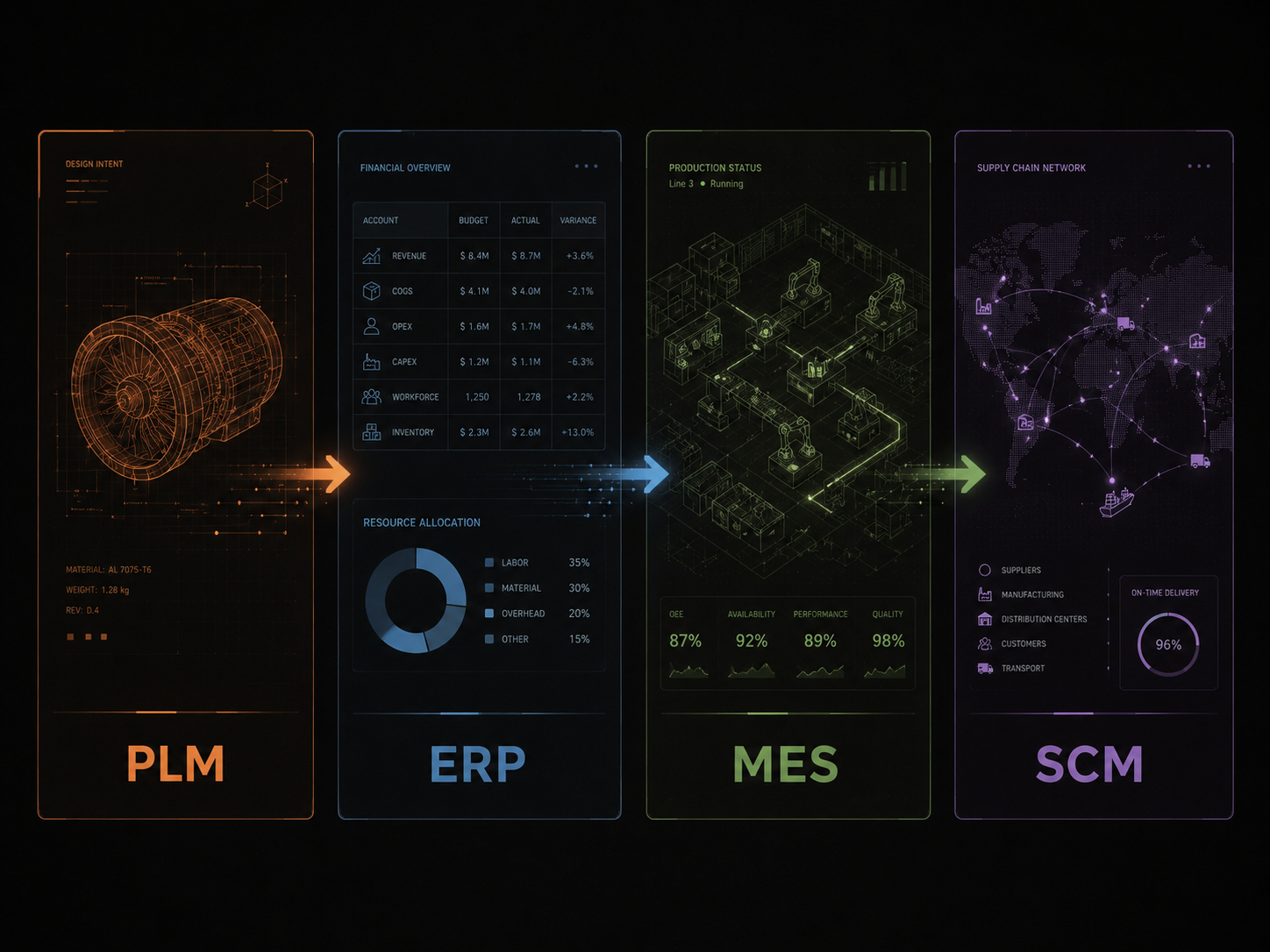
The tools exist. The problem is knowing which tool owns which problem. PLM, ERP, MES, and SCM are the four core systems that run modern manufacturing — and each one is built to solve a fundamentally different set of problems. Using the wrong one wastes time. Not knowing which one to use costs programs.
This guide breaks down exactly what each system handles, when to use it, and how they connect — with a decision table you can reference whenever you're unsure.
What is PLM and When Should You Use It?
Product Lifecycle Management (PLM) is the system of record for the product itself — its design data, structure, configuration, and engineering history. PLM manages everything from the first concept sketch to the released engineering BOM, including every change, revision, and approval decision in between. In the Dassault Systèmes world, this is ENOVIA on the 3DEXPERIENCE platform; in other ecosystems it may be Teamcenter or Windchill.
Use PLM when the problem is related to product definition and engineering control. If someone is asking about what a product is, what revision it's on, who approved the last change, or what configuration was released for production — that's a PLM question.
| Area | What it handles |
|---|---|
| Product Design | Manages CAD data, drawings, specifications, and design documents |
| EBOM | Controls engineering bills of materials, product structures, and design intent |
| Change Management | Handles ECR, ECO, approvals, revisions, and release workflows |
| Configuration | Manages variants, options, effectivity, and product complexity |
| Traceability | Tracks requirements, revisions, decisions, and product history |
What is ERP and When Should You Use It?
Enterprise Resource Planning (ERP) is the system that manages business operations around the product — costing, procurement, inventory, and production planning. Where PLM is about the product, ERP is about the resources needed to build and deliver it. SAP and Oracle are the dominant players; in the manufacturing space SAP S/4HANA is widely used alongside PLM systems.
Use ERP when the problem is related to business planning and resource control. If someone is asking about margins, purchase orders, stock levels, or when a production run is scheduled — that's an ERP question.
| Area | What it handles |
|---|---|
| Item Master | Manages material records used for planning, costing, and procurement |
| Costing | Tracks product costs, margins, budgets, and financial impact |
| Procurement | Manages purchase orders, suppliers, sourcing, and material availability |
| Inventory | Controls stock levels, warehouses, and material movement |
| Production Planning | Supports MRP, capacity planning, demand planning, and scheduling |
What is MES and When Should You Use It?
Manufacturing Execution System (MES) is the system that lives on the shop floor and manages what actually happens during production. ERP tells the factory what to produce; MES manages how it gets produced — in real time. It captures every step, every defect, every deviation, and every substitution that occurs during manufacturing.
Use MES when the problem is related to shop-floor execution and production control. If someone is asking about work order status, operator instructions, real-time output, or why a batch failed quality — that's an MES question.
| Area | What it handles |
|---|---|
| Work Orders | Executes production orders received from ERP or planning systems |
| Work Instructions | Delivers operator instructions, routing steps, and process guidance |
| Production Tracking | Captures real-time status, output, downtime, and production progress |
| Quality Checks | Records inspections, defects, non-conformances, and process quality data |
| As-Built Data | Captures what was actually produced, used, changed, or substituted |
What is SCM and When Should You Use It?
Supply Chain Management (SCM) is the system that coordinates everything outside the factory — suppliers, logistics, demand forecasting, and material flow across the extended value chain. Where ERP manages internal resources, SCM manages the external network those resources depend on. Tools like SAP IBP, Kinaxis, or Blue Yonder handle this space.
Use SCM when the problem is related to supply, demand, logistics, and supplier coordination. If someone is asking about a delayed shipment, a supplier risk, a demand forecast, or inventory across multiple warehouses — that's an SCM question.
| Area | What it handles |
|---|---|
| Demand Planning | Forecasts customer demand and aligns supply plans |
| Supplier Management | Coordinates suppliers, lead times, risks, and delivery commitments |
| Logistics | Manages transportation, distribution, and delivery flows |
| Supply Visibility | Tracks material availability, shortages, and supply disruptions |
| Inventory Flow | Optimizes material movement across suppliers, warehouses, and customers |
How PLM, ERP, MES, and SCM Work Together
The four systems form a single continuous data chain — each one hands off to the next as a product moves from concept to customer. The chain only works when the handoffs are clean. Most digital transformation failures aren't tool failures; they're integration failures at the boundaries between these systems.
Quick Reference: Which System to Use?
Use this table the next time a problem lands on your desk and you're unsure which system owns it. The question is always: what kind of problem is this?
| Problem you're facing | System to use |
|---|---|
| The BOM structure is wrong or outdated | PLM |
| A component revision hasn't been approved for release | PLM |
| An engineering change needs to go through approval | PLM |
| We don't know if we have enough material for next week | ERP |
| A purchase order hasn't been raised for a critical part | ERP |
| Production costs are over budget and we need to know why | ERP |
| A work order wasn't dispatched to the shop floor | MES |
| We need to know what actually happened during a production run | MES |
| A non-conformance was recorded but no one can trace it | MES |
| A supplier is behind and we need to assess the impact | SCM |
| A shipment is delayed and production may stop | SCM |
| Demand forecast has changed and supply needs to adjust | SCM |
Frequently Asked Questions
Is PLM part of ERP?
No. PLM and ERP are separate systems with different scopes. PLM manages product definition — design data, BOMs, revisions, and change history. ERP manages business operations — costs, inventory, procurement, and production planning. They integrate at the point where a released engineering BOM transfers into ERP as an item master, but they are architecturally and functionally distinct.
What is the difference between MES and ERP?
ERP plans production — it schedules work orders, allocates materials, and manages capacity at a business level. MES executes production — it dispatches those work orders to the shop floor, tracks real-time progress, captures quality data, and records what was actually built. ERP works with planned data; MES works with actual data. You need both to close the loop between planning and reality.
Does PLM replace CAD?
No. CAD tools like CATIA create the design data. PLM systems like ENOVIA manage that data — storing it, versioning it, controlling access, and routing it through approval processes. PLM is the vault and governance layer around CAD outputs, not a replacement for the design tool itself. In the 3DEXPERIENCE platform, both live in the same environment, which eliminates the traditional file-based handoff between them.
How does SCM connect to ERP?
ERP generates internal demand signals based on production plans and inventory positions. SCM takes those signals and translates them into supplier orders, logistics schedules, and network-wide inventory optimization. When supply conditions change — a supplier delay, a logistics disruption — SCM models the impact and feeds revised availability back to ERP. The two systems share data continuously; neither works as well in isolation.
Can one system do the job of all four?
Some vendors claim to cover multiple domains — SAP, for instance, has modules that touch ERP, SCM, and some MES functions. But breadth usually comes at the cost of depth. Purpose-built PLM systems handle engineering change management and product configuration far better than an ERP module. Purpose-built MES systems capture shop-floor data with far more granularity than a generic production module. Most mature manufacturers run specialized systems and invest in the integration between them.
The Bottom Line
The confusion between PLM, ERP, MES, and SCM is one of the most common — and most expensive — misunderstandings in manufacturing organizations. These are not competing systems. They are complementary ones, each purpose-built to own a distinct domain of the product and production lifecycle.
From two and a half years working with Dassault Systèmes tools across Transport & Mobility and Aerospace programmes, the pattern I've seen repeatedly is this: the tool is usually in place. The gap is in knowing which tool to ask which question. Get that right and the system investments your organization has already made will start returning significantly more value.
Written from hands-on experience working with Dassault Systèmes tools across Transport & Mobility and Aerospace & Defence programmes. Views are my own. For PLM, digital manufacturing, or Industry 4.0 questions, let's connect →