PLMENOVIABOM
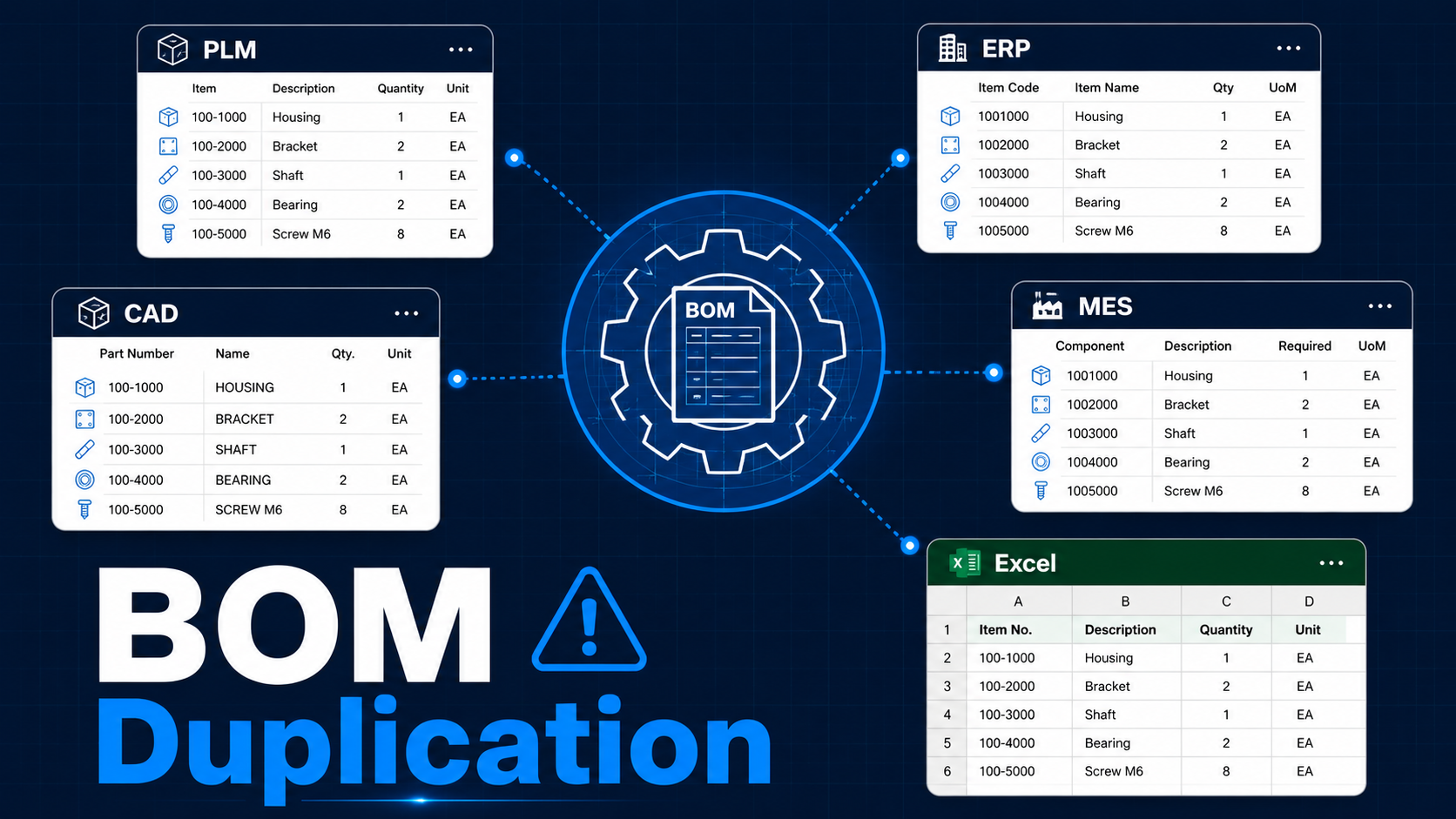
BOM Duplication Across Systems:
10 Reasons It Happens
Three systems. Three BOMs. Zero agreement on which one is right. Here's exactly how this becomes the default state — and what the fix actually looks like.
·Jun 3, 2026
·6 min read
·PLM · BOM · ENOVIA
You open PLM. Your colleague checks ERP. The supplier quotes from an Excel file someone emailed last quarter. Three systems. Three BOMs. Zero agreement on which one is right.
This is not a rare edge case. In most manufacturing organisations, BOM duplication is the default state — not an exception. And it silently drives up costs, delays product launches, and creates supplier errors that only surface at the worst possible moment.
4+
Systems holding the same BOM
10
Root causes of duplication
∞
Cost when errors compound
What BOM Duplication Is — and Why It's So Costly
A Bill of Materials is supposed to be a single, authoritative definition of a product — its parts, quantities, relationships, and structure. In practice, most organisations end up with multiple versions of that definition living in different systems, owned by different teams, updated on different schedules.
The result: nobody knows which BOM is the trusted source. This is not just a data quality problem. It directly impacts procurement planning, shop-floor execution, supplier quoting, and engineering change management. Every hour spent reconciling BOMs is an hour not spent building product. And every undetected discrepancy is a potential production stoppage waiting to happen.
🔍
Why this matters beyond data quality
BOM duplication isn't an IT problem. It's a business risk. Procurement plans from the wrong revision. Production builds from an outdated sequence. Suppliers quote from a superseded structure. Each of these creates real cost — and the errors compound silently until they surface on the factory floor at the worst possible time.
10 Ways BOM Gets Duplicated Across Systems
Design-Side Leaks
CAD assemblies naturally become the first product structure. But when PLM teams manually recreate or reorganise that structure as an
EBOM, the two start drifting — especially after design changes that don't get reflected in both tools simultaneously.
Result: CAD and EBOM are out of sync before the product even reaches manufacturing.
Instead of a governed, automated handoff, many teams simply copy parts and quantities from PLM into ERP by hand. This creates an immediate fork — the ERP BOM is now a static snapshot, not a live reflection of the engineering record.
Result: ERP runs procurement and production planning on data that may already be outdated.
Operations-Side Copies
Manufacturing teams have legitimate reasons to restructure the EBOM for shop-floor execution — phantom assemblies, production sequences, work centre assignments. But when this is done as a separate rebuild rather than a governed transformation, EBOM and MBOM become two independent documents.
Result: Engineering and manufacturing are working from different product definitions simultaneously.
Someone exports a BOM to Excel for a supplier review. Another person downloads it for a quick edit. A third uses it to track a change request. None of these files are version-controlled. All of them circulate — and all of them eventually diverge from the system of record.
Result: Excel becomes an unofficial BOM source that no system owns and nobody can retire.
When PLM, ERP, MES, and Excel all "own" parts of the BOM — different line items, different lifecycle stages, different teams — duplication becomes structurally normal. There's no single system with authority over the product definition.
Result: Reconciliation becomes a recurring manual exercise instead of an exception.
An
Engineering Change Order updates the PLM BOM. But ERP, MES, supplier records, and service documentation remain on the previous revision until someone manually updates them — if they ever do.
Result: Different functions execute against different product definitions simultaneously.
Ecosystem Sprawl
Vendors often receive PDFs, Excel exports, or old revision packages via email rather than controlled access to a supplier portal. These files have no version tracking and no update mechanism — they're frozen at the moment of export.
Result: Suppliers quote and build from outdated BOM revisions — sometimes without anyone knowing until parts arrive wrong.
When organisations move to a new PLM or ERP, old BOMs, duplicate part numbers, and obsolete structures are often migrated as-is to hit go-live timelines. Data cleanup is deferred — and typically never happens.
Result: The new system inherits every duplication problem the old system had, plus any introduced during migration.
Instead of configuring variants through a managed 150% BOM or modular product structure, each product option or customer-specific build gets its own BOM copy. Small changes then need to be propagated across dozens of files manually.
Result: Change management becomes exponentially more expensive as the variant library grows.
After product launch, service and aftermarket teams build spare-parts lists independently because the original EBOM or MBOM doesn't map cleanly to maintenance workflows. A third BOM tree emerges — disconnected from both engineering and manufacturing.
Result: Service documentation, spare-parts catalogues, and field BOMs drift further from the product record with every revision.
What Good Actually Looks Like
The fix is not a better spreadsheet or a stricter naming convention. It's a structural decision about system ownership.
A well-governed BOM architecture has one backbone — typically PLM — from which all downstream views are derived, not duplicated. The EBOM lives in PLM. The MBOM is a configured transformation of it, not a separate document. ERP receives a governed, automated handoff — not a manual copy. Suppliers access a controlled portal, not an emailed file. ECOs propagate through all affected systems as part of the change workflow, not as a reminder to someone's inbox.
This is what "single source of truth" actually means in practice: not one giant spreadsheet, but one system of record with governed, traceable handoffs to every downstream consumer.
The Bottom Line
BOM duplication is rarely the result of negligence. It's the predictable outcome of systems that weren't designed to talk to each other, teams that optimised locally, and organisations that deferred governance decisions under launch pressure.
Understanding where the copies come from is the first step to eliminating them. The second step is making a structural decision about which system has authority — and building governed handoffs to everything else.
For a practical look at how BOM types work and where the handoffs break, see How BOM Actually Works in Real Projects.
If you found three BOMs for the same product today — which one would you trust?
Written from hands-on PLM implementation experience across Transport & Mobility and Aerospace & Defence programs. Views are my own.