
Why Do PLM Implementations Fail? (Top Reasons & How to Fix Them)
Why do PLM implementations fail? Explore the key challenges, real-world mistakes, and proven fixes to improve adoption, processes, and ROI in your PLM projects.
Introduction: The Uncomfortable Reality
Organizations invest heavily in Product Lifecycle Management (PLM) systems expecting streamlined processes, better collaboration, and faster product development. On paper, the promise is compelling.
But in reality?
Many PLM implementations struggle with low adoption, process inefficiencies, and poor return on investment. Despite spending crores, teams still fall back to Excel sheets, emails, and disconnected tools.
This raises a critical question:
Why do PLM implementations fail—even after significant investment?
What is PLM ? and Why Companies Invest in It?
Product Lifecycle Management (PLM) is a strategic approach to managing a product’s entire lifecycle—from concept and design to manufacturing and service.
Companies adopt PLM to:
Create a single source of truth
Improve cross-functional collaboration
Reduce time-to-market
Ensure traceability and compliance
However, the gap between expectation and reality is where most problems begin.
The Truth: PLM Doesn’t Fail—Implementation Does
PLM tools like ENOVIA, Teamcenter, or Windchill are mature and powerful.
Failures rarely happen because of the tool itself.
They happen because of how the implementation is approached.
Top Reasons Why PLM Implementations Fail
1. Lack of Clear Business Objectives
Many organizations start with a vague goal: “We need a PLM system.”
But:
What problem are you solving?
What KPIs define success?
Without clarity, the system becomes a digital storage tool—not a business enabler.
2. Treating PLM as an IT Project
This is one of the biggest mistakes.
PLM is not just software deployment. It is a business transformation initiative involving:
Engineering
Manufacturing
Supply chain
Quality teams
When treated purely as IT, business alignment is lost.
3. Poor Requirement Gathering
Often, requirements are:
Too generic
Driven by assumptions
Not aligned with actual user workflows
Result?
A system that looks good in demos but fails in real usage.
4. Over-Customization
Heavy customization—especially in platforms like ENOVIA—creates long-term problems:
Difficult upgrades
High maintenance cost
Increased system complexity
Ironically, trying to “fit everything perfectly” ends up breaking scalability.
5. Weak Change Management
Engineers and business users resist change when:
They are not trained properly
The system feels complex
Benefits are unclear
Without structured change management, adoption drops significantly.
6. Lack of Stakeholder Involvement
When decisions are driven only by IT or external vendors:
Business teams feel disconnected
Real needs are missed
PLM success requires strong cross-functional ownership.
7. Data Migration Issues
Legacy data is often:
Inconsistent
Incomplete
Poorly structured
Migrating bad data into a new system creates a clean system with dirty inputs—which defeats the purpose.
8. Unrealistic Expectations
Leadership often expects:
Quick implementation
Immediate ROI
But PLM is a long-term investment that matures over phases.
9. Poor Integration Strategy
PLM doesn’t operate in isolation.
Weak integration with:
CAD systems (CATIA, NX, SolidWorks)
ERP systems
Leads to fragmented workflows and duplication.
10. Over-Dependency on Vendors
Relying entirely on implementation partners results in:
Lack of internal knowledge
Limited control
High long-term costs
Organizations must build internal PLM capability.
Warning Signs Your PLM Project is Failing
Watch out for these early indicators:
Low user adoption
Continued reliance on Excel
Frequent complaints from engineers
Workarounds outside the system
Delays in approvals and workflows
If these exist, the issue is not the tool—it’s the implementation approach.
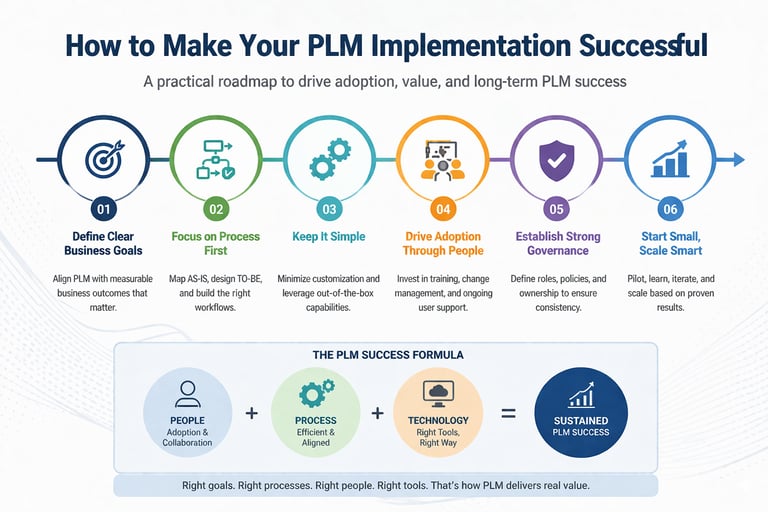
How to Make Your PLM Implementation Successful?
1. Define Clear Business Goals
Tie PLM to measurable outcomes:
Reduced design cycle time
Improved change management efficiency
2. Focus on Process First, Tool Next
Before implementing:
Map current (AS-IS) processes
Design optimized (TO-BE) workflows
3. Minimize Customization
Use out-of-the-box capabilities wherever possible.
Customize only when it delivers clear business value.
4. Invest in Change Management
This includes:
User training programs
Clear communication
Continuous support
Adoption is the real success metric.
5. Establish Strong Governance
Define:
Roles and responsibilities
Decision-making hierarchy
Avoid chaos during and after implementation.
6. Follow a Phased Approach
Start small:
Pilot projects
Gradual rollout
Scale based on success and learning.
7. Build Internal Capability
Train internal teams to:
Manage the system
Handle configurations
Reduce vendor dependency
A Common Real-World Pattern
A company invests heavily in PLM.
The system is deployed successfully.
But:
Users find it complex
Training is minimal
Excel usage continues
Within months, adoption drops.
The issue wasn’t the tool—it was the lack of alignment between people, process, and technology.
Conclusion
PLM implementations don’t fail because the technology is weak.
They fail because organizations underestimate the human and process aspects.
The reality is simple:
PLM success is 20% tool and 80% execution.
If done right, PLM can transform how organizations build and manage products.
If done wrong, it becomes just another expensive system nobody wants to use.
© 2026 Chandan N